
User menu is located under settings in feed.
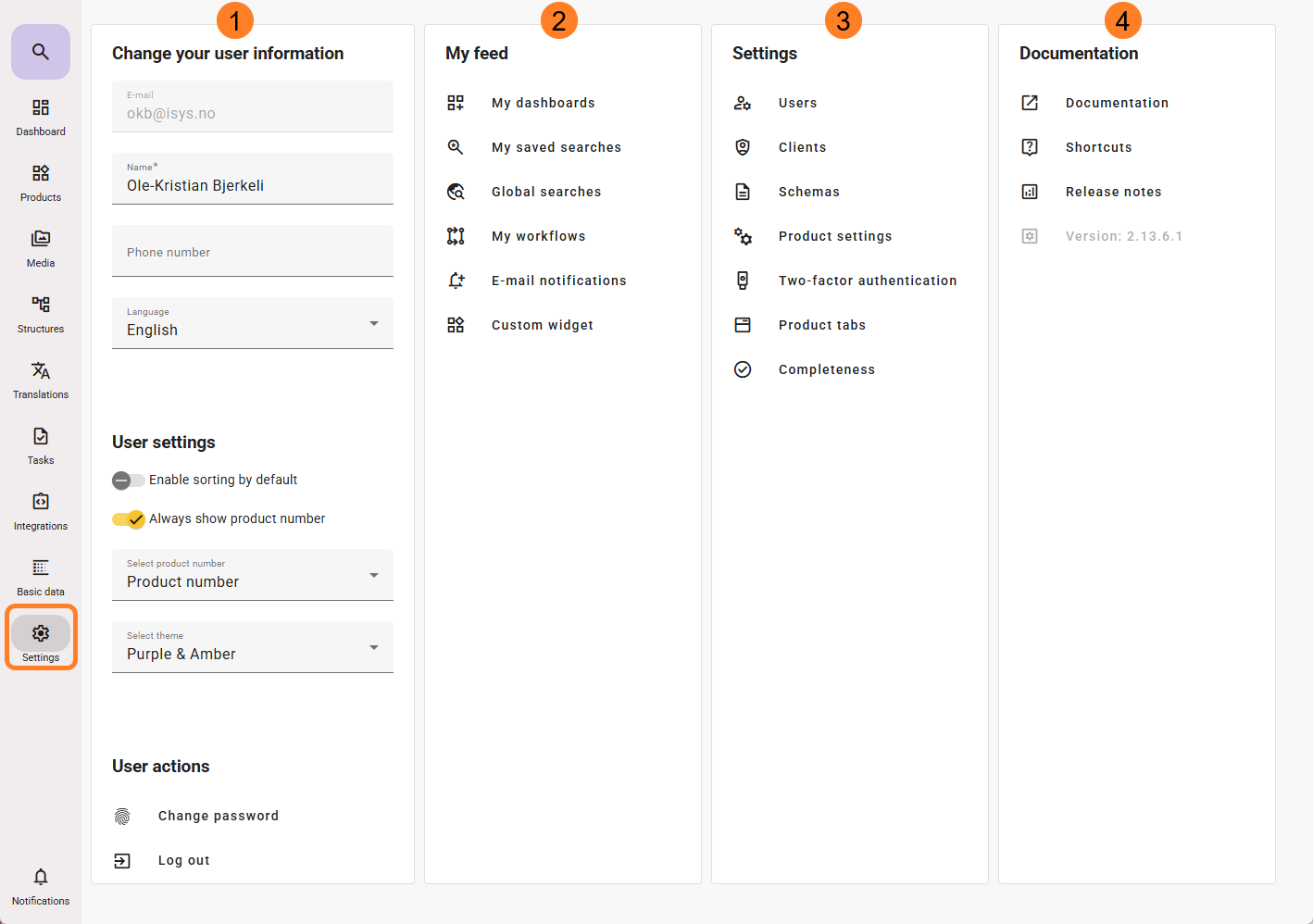
From the user menu, you can:

Change your User information:
- E-mail (This is your login and cannot be changed)
- Name
- Phone number
- Language (changes the users language for Basic data, product values and search language)
User settings:
- Enable sorting by default
 :
:
Enable/disable sorting in some product tabs. If disabled you will find this icon on the upper right corner of the tab , and you will have to activate it each time you want change the sort order on that tab (it will auto disable itself after you change tab).
 - Always show product number
 will activate the visibility of feed product number shown on filtered products when you are working on adding search filters.
 - Select theme:
Available color themes for feed (sets your preffered user color setting)
User actions:
- Change password
- Log out

My feed:
- My dashboards (add/edit dashboards, change to another active dashboard) (read more here)
- My Saved Searches (list of your searches, and share with others) (read more here)
- Global Searches (list of global searches. Enable/disable view, or force on dashboards) (read more here)
- My workflows (View, or create containers for your workflows) (read more here)
- E-mail Notifications (read more here)
- Custom Widget

Settings (applicable for Administrators):
- Users (add/remove/edit user access for feed users) (read more here)
- Clients (add/remove/edit feed API client access directly from feed) (read more here)
- Schemas (add/remove/edit feed Schema user access privileges) (read more here)
- Product settings (read more here)
- Two-factor authentication (read more here)
- Product tabs (for generating custom tabs)
- From feed version 23.13.3, texts have been converted into attributes. Those who had a feed prior to this version have had their existing text fields set up as a custom tab.
- Completeness

Documentation
- Shortcut to user documentation/manual
- Shortcuts (Keyboard shortcuts for feed)
- Release Notes (Most recent, and history of release notes)
- feed version number is listed